How to bulk translate your store
Bulk Translate is the fastest way to translate your whole store. It translates multiple resource types across one or more languages in a single job — products, collections, pages, blogs, articles, menus, email templates, theme content, and more.
Bulk Translate is available on every plan.
Run a bulk translation
- Open Lokalize → Bulk Translate.
- Choose your target languages — only AI-enabled languages appear.
- Choose the resource types you want to translate.
- Click Translate.
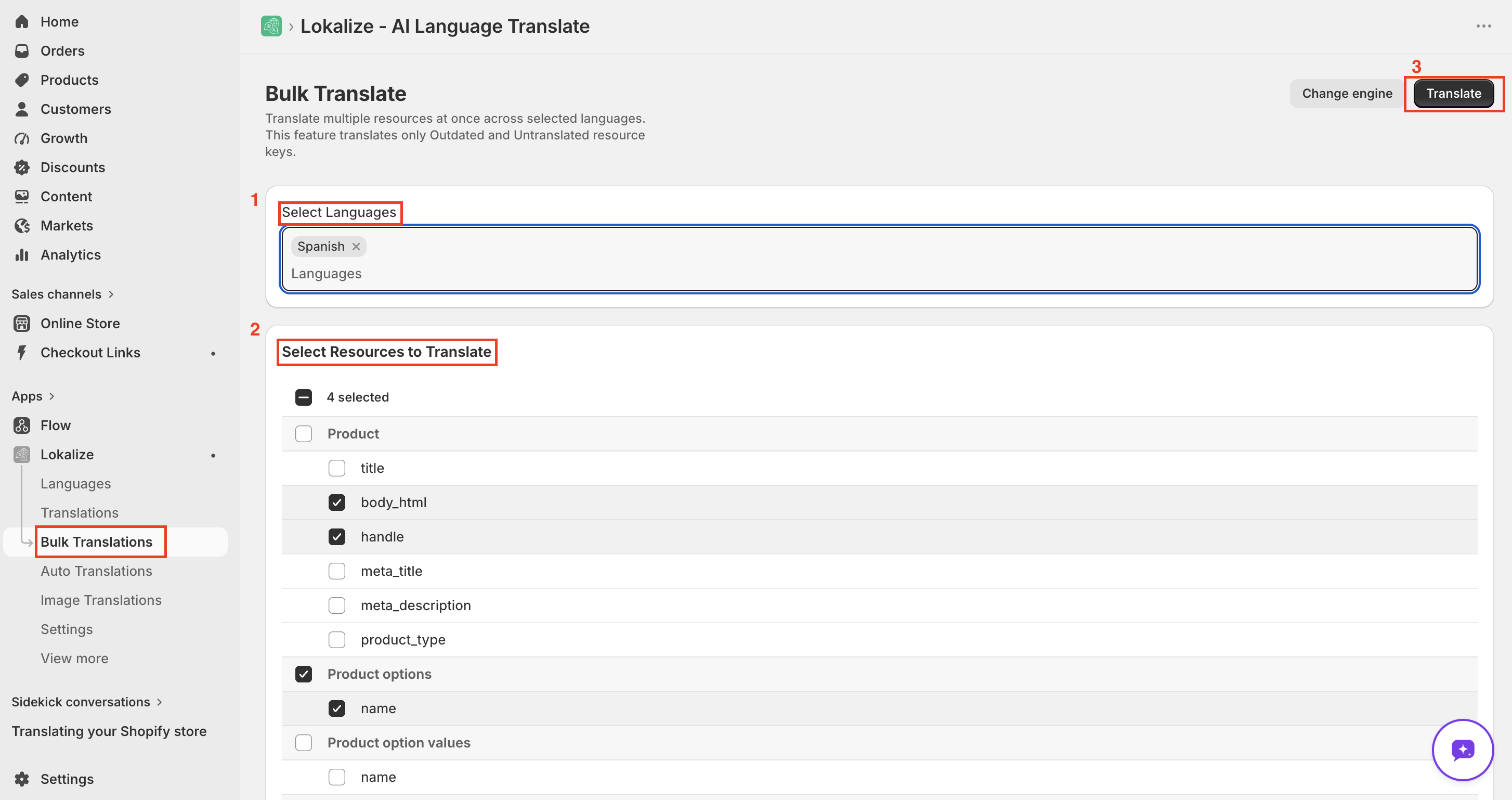
You're taken to a Job Detail page that shows real-time progress. You can safely navigate away — you'll receive an email when the job completes.
Only what needs translating
Bulk Translate only processes content that is untranslated or outdated. Fields that already have an up-to-date translation are skipped, so you don't spend credits re-translating content that hasn't changed.
If the Glossary is enabled, its rules are applied to every segment during the job for consistent terminology.
Outdated means the field was previously translated but the original text has since changed.
Choose which fields to translate
For each resource type you can translate all fields or pick specific ones — such as title, description, URL handle, or SEO metadata. Translating only the fields you need helps conserve credits.
Translating metafields
Metafields are included via a dedicated Metafields row, where you list the exact fields to translate. See How to translate product metafields.
Credits
- Theme content is always free — it doesn't use any word credits.
- All other resource types count against your word balance.
If your balance runs out mid-job, the job stops and you'll see an insufficient-credits message on the Job Detail page. Any translations already registered before the balance ran out are kept. Add credits — buy a word pack or wait for your monthly allowance to reset — then re-run the job to translate the rest. See Lokalize plans compared.
A note on Shop Policies
Shop Policies (refund, privacy, terms) aren't included in Bulk Translate. They're legal documents where an automated translation could introduce inaccuracies with legal implications. You can still translate them individually from the Translations page, where you can review each field before saving.
Frequently asked questions
Does it re-translate content that is already translated?
No. Bulk Translate only processes untranslated and outdated content. Fields that already have an up-to-date translation are skipped, so you do not spend credits unnecessarily.
What happens if I run out of credits mid-job?
The job stops and you will see an insufficient-credits message on the Job Detail page. Any translations already registered before the balance ran out are kept. Purchase a word pack or wait for your monthly allowance to reset, then re-run the job to translate the remaining content.
Why are Shop Policies not included in Bulk Translate?
Shop Policies are legal documents where an automated translation could introduce inaccuracies with legal implications. You can still translate them individually from the Translations page, where you can review each field before saving.